
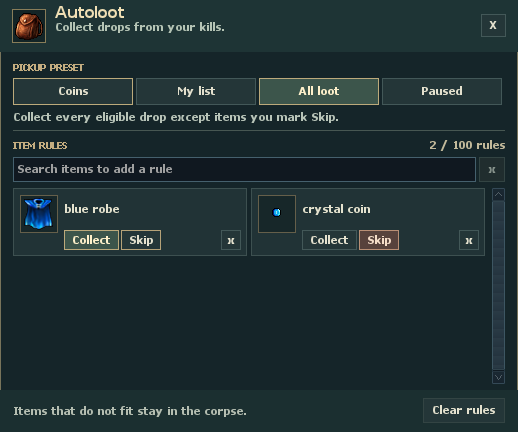
All loot
All loot sends eligible drops to your pack unless an item has a Skip rule.
Collect a blue robe
The saved Collect rule keeps blue robes on the pickup list even if you switch to Coins or My list.
Skip a crystal coin
The highlighted Skip rule leaves crystal coins in the corpse even with All loot selected.
Choose what goes in your pack
Open Autoloot from the game menu or type !autoloot in chat. Your pickup preset applies when a monster corpse credits you. A new character starts on Coins.
- Coins
- Collect gold, platinum and crystal coins. Add an item rule for anything else you want to keep, or skip a coin type.
- My list
- Collect only items marked Collect. To take coins too, give each coin type you want its own Collect rule.
- All loot
- Collect every eligible item except the ones marked Skip.
- Paused
- Leave drops in the corpse. Your saved rules take effect again when you choose an active preset.
Save a rule for the next hunt
For an alchemy run, choose Coins, type “wolf paw” in the search field, then click Collect on the matching card. Future credited kills can now send both coins and wolf paws to your pack. Take the paws to Alchemy to dismantle them.
Search accepts two or more letters. You can also open an item’s menu in your backpack and choose Always collect with autoloot or Skip with autoloot. Right-click with the standard controls, or Ctrl+right-click with classic controls.
The small × on a saved item card returns that item to the current preset. Clear rules asks for confirmation and removes all personal rules while keeping the selected preset. Each character can save 12 rules, or 100 with premium.
Check a missing drop
First check the corpse. An item there passed its drop roll. Check your preset, any Skip rule, and whether you have a backpack equipped. Autoloot tries the pack and bags inside it. If it runs out of room or carrying capacity, the items it cannot move stay in the corpse. A stack can move in part.
Open your character sheet and hover over Loot chance to see the breakdown. The percentage scales each item’s own chance. At the 100% reading below, an item with a base chance of 5% still has a 5% chance against an ordinary monster. Fate and active loot boosts can raise the rate. Daily boosted monsters have their own bonus. Standard monster loot requires more than 14 hours of stamina.
The Hunt Analyzer’s Auto Loot tab records what autoloot actually moved, including the part of a stack that fit. You can check it after a hunt to see which pickups your rules brought home.
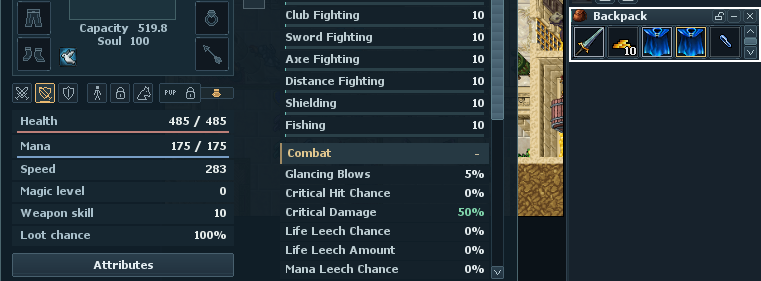
Loot chance
This character has a 100% multiplier on standard loot. Hover over the reading in game to see the active bonuses.
Free capacity
Capacity shows 519.8 available for more items. Autoloot also needs space in the equipped pack or one of its bags.
Carried items
The open backpack holds a stack of 10 gold coins beside two blue robes. Matching items must fit here or in a bag inside it.