
Property details
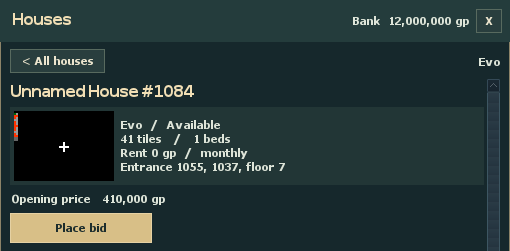
This 41-tile house has one bed and costs 0 gp in monthly rent. The last line gives its entrance coordinates and floor.
Opening price
The first bid opens at 410,000 gp. A higher maximum gives the auction room to bid for you.
Place bid
Select Place bid to enter a maximum. The next screen lets you review how much gold your bank will reserve.
Find a house
Open Houses from the game menu. Choose a town and select Available to find properties waiting for their first bid, or At auction to see bidding already underway. Choose By bid to put the lowest prices first, or By auction end to see which auctions close soonest.
Select a property to see its size, beds, rent and entrance coordinates. The opening price is 10,000 gp per house tile. Rent is shown separately and runs monthly. This example has 41 tiles, so it opens at 410,000 gp.
Set your maximum bid
Put enough gold in your bank to cover your maximum. Choose Place bid, enter a whole amount, then select Review. Check the amount the bank will reserve and select Place bid again to submit.
The first bid starts a seven-day auction. Suppose you offer 415,000 gp on this house. The bank reserves that amount while you lead, and the public price starts at 410,000 gp. If someone offers 414,000 gp, your automatic bid rises to 414,001 gp. An equal maximum leaves the earlier bidder ahead.
If another player takes the lead, your reserved gold returns to your bank. The next daily server save or restart after bidding closes awards the lease. The winner pays the final public price and gets the unused part of their maximum back.
Your account can hold a house, lead an auction, or have an accepted incoming transfer for one property at a time. Bids and transfers require Premium, which EvoLight currently grants to every account.
Give someone access
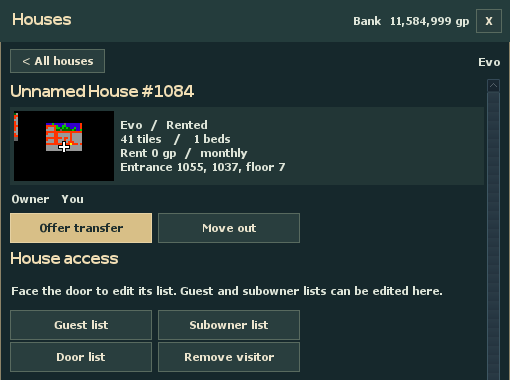
Open My houses & bids and select your house. Choose Guest list, enter a character name on its own line, and save the list. Use Subowner list for someone you trust to edit the guest list.
To set access for one door, stand facing that door and choose Door list on the property screen. Remove visitor lets you send a named character inside the house back to the entrance.
Transfer or move out
Offer transfer names the next owner. Move out returns the house to the market. Pack your belongings before either action.
Guests and subowners
Guest list lets you invite characters inside. Subowner list grants a character permission to manage the guest list.
Door list
Stand facing a door of this house and choose Door list to edit access for that door.
Transfer the lease or move out
Pick up your loose items and empty the containers in the house. Keep it packed until the handover finishes. Choose Offer transfer, enter the recipient’s character name and price, then review and confirm. Set the price to 0 gp for a gift.
The recipient opens the offer in Houses and chooses Accept offer. Their bank reserves the price until the next server save completes the transfer. To return an empty property to the market, choose Move out. You can use Cancel request before the handover.